Moderation is the step where a librarian checks a researcher's deposit before it becomes a public document. This page covers the moderator's side of the process; for the submitter's side, see Deposit a document.
Find the deposits waiting for you
- Open the administration interface (Username > Administration)
- Open the menu Deposits
- Filter on the status to validate
Moderators and administrators of the organisation receive an e-mail for every deposit that reaches this status, so the queue and your inbox say the same thing.
If your organisation uses subdivisions, you only receive notifications for the deposits of your own subdivision, and moderators without a subdivision receive those of deposits without one. Administrators are notified for all of them. The subdivision name is repeated in the e-mail subject, which makes filtering straightforward in your inbox.
Review a deposit
Open the deposit. When its status is to validate and you have the moderator role, a Deposit review panel appears at the end of the form, with a comment box and four buttons.
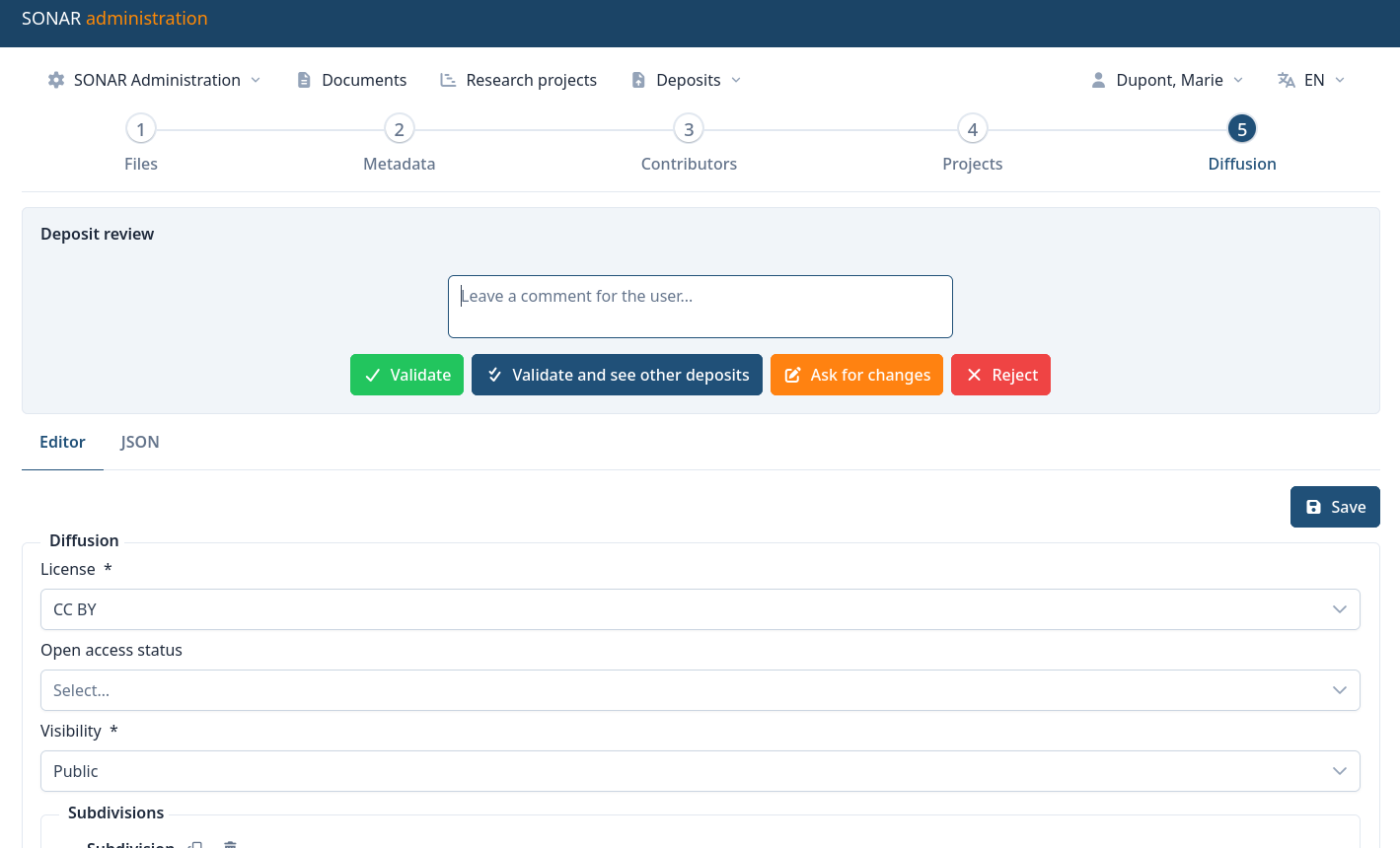
| Button | What it does |
|---|---|
| Validate | Accepts the deposit. A document is created from it and you are redirected to it. |
| Validate and see other deposits | Same thing, then returns to the deposit queue instead. Use it when you have multiple deposits to check. |
| Ask for changes | Sends the deposit back to the submitter, who can edit it and submit it again. |
| Reject | Refuses the deposit. No document is created. |
The comment box is sent to the submitter with the notification. Fill it in for Ask for changes and Reject to give more info to the submitter.
Every action is recorded in the deposit's history, with its author, its date and its comment.
What to check before validating
Validation is the last moment where correcting the record is cheap, and the only moment where the submitter is still in the loop.
- The right to publish. The authors agree to the deposit and no publisher contract is breached. Sherpa Romeo lists the self-archiving policies of most journals.
- The version of the file. Preprint, postprint or published version are not interchangeable, and the allowed one depends on the publisher.
- The document type, against the COAR list. It drives the facets, and it is tedious to correct across a corpus afterwards.
- Metadata imported from a PDF or from swisscovery. Import is a time-saver, not an authority: author names, affiliations and dates come back wrong often enough to be worth a glance.
- Identifiers. A DOI or an ORCID entered now saves a deduplication problem later.
- Access and embargo on each file. Check this before validating: validation publishes each file in the state it is in, embargo date included.
After validation
Validating converts the deposit into a document, and the two then live separate lives:
- the deposit is closed and archived — it keeps its history, but is no longer edited;
- the document is what the public sees, and it is edited from the menu Documents, with the full set of fields. See Manage documents.
Corrections made after validation therefore go to the document, never back to the deposit.
A moderator or an administrator submitting their own deposit never passes through this queue: it is validated on submission and turned into a document straight away.
Rights and limits
In an organisation using subdivisions, a moderator handles the deposits of their own subdivision only. They read every document of the organisation, but may only edit those carrying their own subdivision. See Subdivisions.
For the full picture of who may do what, see Users and roles.